

In a context of accelerating digital transformation, efficient data and configuration management is becoming crucial for companies. PeopleSoft ‘s Data Migration Workbench(DMW) represents an advanced solution for automating and securing migrations between environments, particularly well-suited to the challenges of 2025. Discover how the Data Migration Workbench can transform your migration management and optimize the efficiency of your teams.
What is the Data Migration Workbench?
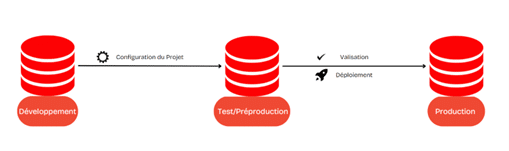
The Data Migration Workbench is an integrated PeopleTools module designed for complex migrations requiring perfect consistency between development, test and production environments. Unlike manual scripts, the DMW reduces the risk of errors and improves data traceability, guaranteeing efficient, seamless migration.
Key features of the Data Migration Workbench
1. Migration without scripts
With DMW, automation replaces manual scripts, offering increased security and a significant reduction in human error.
2. Creating custom datasets
Datasets are configured to meet the specific needs of each migration. Whether security parameters, user configurations or financial parameters are involved, DMW enables targeted, precise migration.
3. Traceability and compliance
Every operation is documented, making it easy to audit and track changes. This traceability is essential for organizations subject to stringent compliance requirements.
Advantages of configuring and using DMW
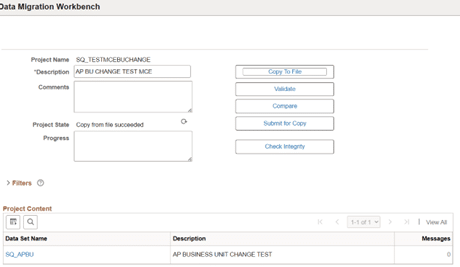
From the PeopleTools menu, access the Data Migration Workbench, then create or select a project. Configure parameters, source and target environments, and add descriptions to document the project.
2. Add and configure data set contentIn the Project Content section, add the objects required for migration and customize options such as Is Copyable to indicate which objects are to be copied, or Include in Compare to check data consistency between environments.3. Validate and execute migration
Before applying the changes, DMW enables datasets to be validated. This verifies data integrity and detects potential inconsistencies before migration to the target environment.
Why choose PeopleSoft Data Migration Workbench over Oracle PeopleSoft Data Mover?
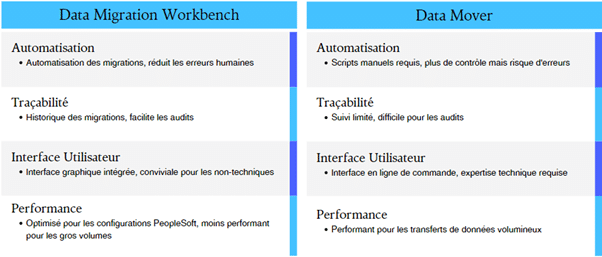
Compared to Oracle PeopleSoft Data Mover, DMW offers several advantages:
● Automation and error reduction: By eliminating manual scripts, DMW reduces errors and improves migration quality.
● Accessible interface: Unlike Data Mover, which requires technical expertise, DMW is integrated into the PeopleSoft interface (PIA) and can be used by less technical teams.
● Traceability: DMW records every step of the way, which is essential for audits and migration tracking, an advantage that Data Mover does not offer.
Use case: How does DMW simplify complex migrations?
- Deployment of user roles
DMW lets you configure datasets to migrate user security roles, ensuring that all permissions and configurations are consistent between test and production environments.
- Migration of financial parameters
For critical financial migrations, DMW ensures that sensitive configurations are transferred accurately, reducing the risk of errors in production.
Best practices for optimizing use of the Data Migration Workbench
- Structuring projects Organize your projects according to modules or specific configurations to facilitate migration management.
- Limit dataset size Limit the number of objects per dataset to optimize DMW performance.
- Configure access rights Restrict access to migration projects to ensure the security of sensitive data.
Conclusion
PeopleSoft ‘s Data Migration Workbench is an asset for companies seeking to optimize their configuration migrations in a secure and traceable way.
With its validation, dataset customization and documentation functions, it transforms the migration process into a reliable and efficient operation.
By using DMW, companies can not only reduce the risk of errors, but also gain in productivity by automating previously manual tasks.