


In brief
The Power BI Modeling MCP Server connects AI agents directly to your Power BI semantic models to create DAX measures, document, and rename objects in bulk—all using natural language. Tasks that used to be time-consuming now complete in seconds, without opening the editor.
What if you could manage your Power BI model using natural language—create DAX measures, generate comprehensive documentation, and rename hundreds of objects in bulk—without ever opening the editor? That’s exactly what Microsoft’s Power BI Modeling MCP Server does, using the Model Context Protocol (MCP) to connect an AI agent directly to your semantic models.
What is the Power BI Modeling MCP Server?
Ever since the emergence of AI agents, one question has consistently come up in Power BI projects: How can a large language model (LLM) interact directly with a semantic model, without relying on manual exports or complex APIs?
The Power BI Modeling MCP Server implements the MCP (Model Context Protocol) specification to establish a direct connection between AI agents and Power BI semantic models. It is a local MCP server that runs on your machine and communicates with Power BI via the XMLA protocol, the same one used by Tabular Editor. Specifically, it provides a set of tools that your AI assistant can use to read, modify, and validate a model exactly as a developer would do manually in Tabular Editor or Power BI Desktop, whether in Power BI Desktop or in a Microsoft Fabric workspace.
The project is available as a Public Preview on GitHub and has already received over 750 stars, which demonstrates the enthusiasm of the Power BI community.
Key Features: What the MCP Server Enables in Power BI
The MCP server offers extensive capabilities:
- Building and Modifying Semantic Models in Natural Language (Power BI Desktop and Microsoft Fabric)
- Perform bulk operations on hundreds of objects simultaneously: renaming, refactoring, translations
- Automatically apply best practices for modeling, including RLS security rules
- Run and validate DAX queries against the model
- Generate complete multilingual translations
- Working with TMDL files and Power BI projects (PBIP) in a Git workflow
Real-World Use Cases in the Field: DAX Automation, Documentation, and Bulk Renaming
- Bulk renaming and naming conventions: Ask the agent to analyze the naming conventions in your Sales table and apply the same pattern to the entire model. What would take half a day to do manually can be done in just a few seconds.
- Automatic Documentation: Generate a complete Markdown document of your semantic model: descriptions of all measures with their DAX logic in business language, a relationship diagram, and data sources analyzed from the Power Query code.
- Creating DAX measures: Ask the agent to create an “Average Basket” measure that calculates revenue divided by total quantity. The agent generates the DAX expression, the currency format, and the business description, and applies them directly in Power BI Desktop.
Turn your raw data into valuable insights
Contact us today to discuss how SQORUS can help you turn your raw data into valuable insights.

How to Install the Power BI Modeling MCP Server in VS Code
The recommended method is to use the Visual Studio Code extension with GitHub Copilot to connect an AI agent to your Power BI semantic model. Prerequisite: Node.js must be installed on your computer (required to run the MCP server from the command line).
The steps are simple:
- 1. Install Visual Studio Code and the GitHub Copilot Chat extension
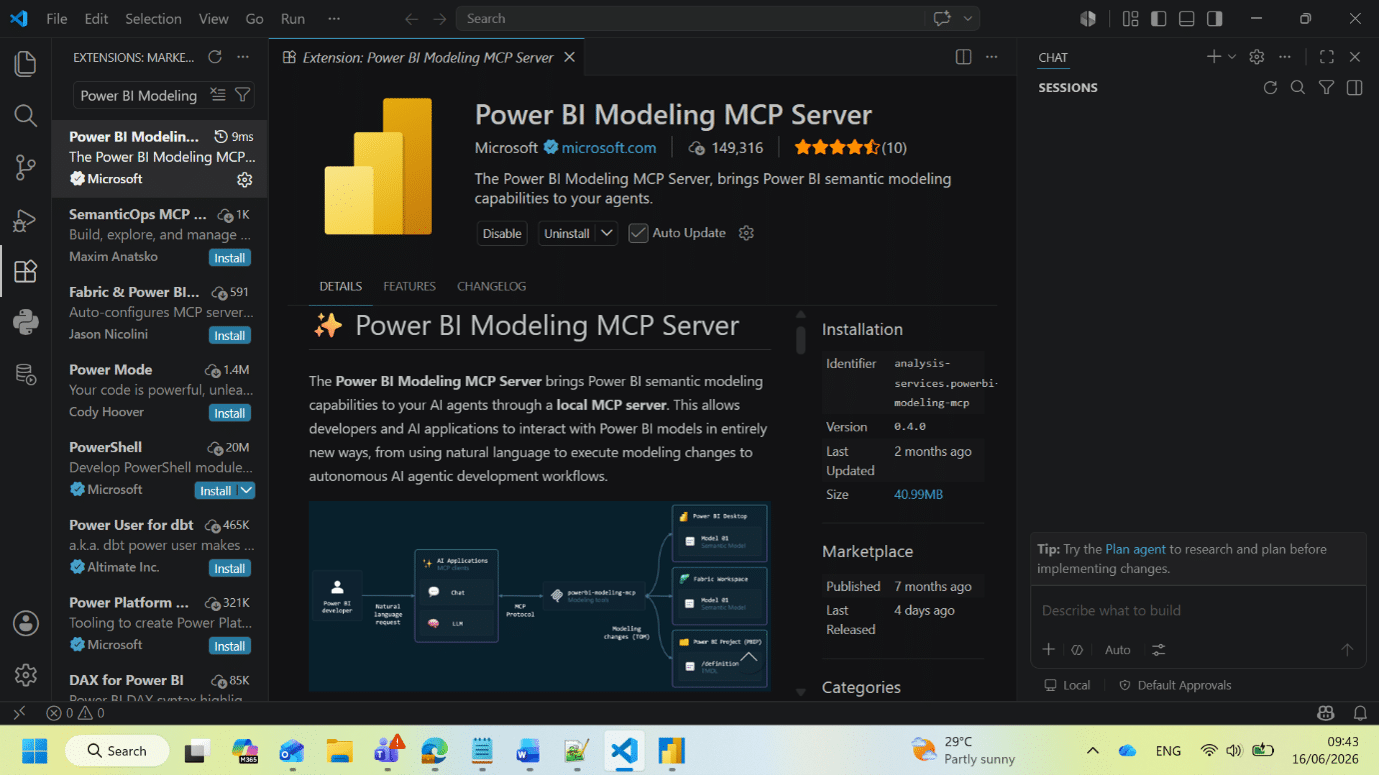
- 2. Install the “Power BI Modeling MCP” extension from the VS Code Marketplace (Microsoft, 149,316 downloads)
- 3. Open GitHub Copilot Chat and verify that “powerbi-modeling-mcp” appears among the available tools
Demonstration: Connecting an AI agent to your Power BI semantic model
Once you’re logged in, you can connect to the semantic model using natural language via Copilot Chat:
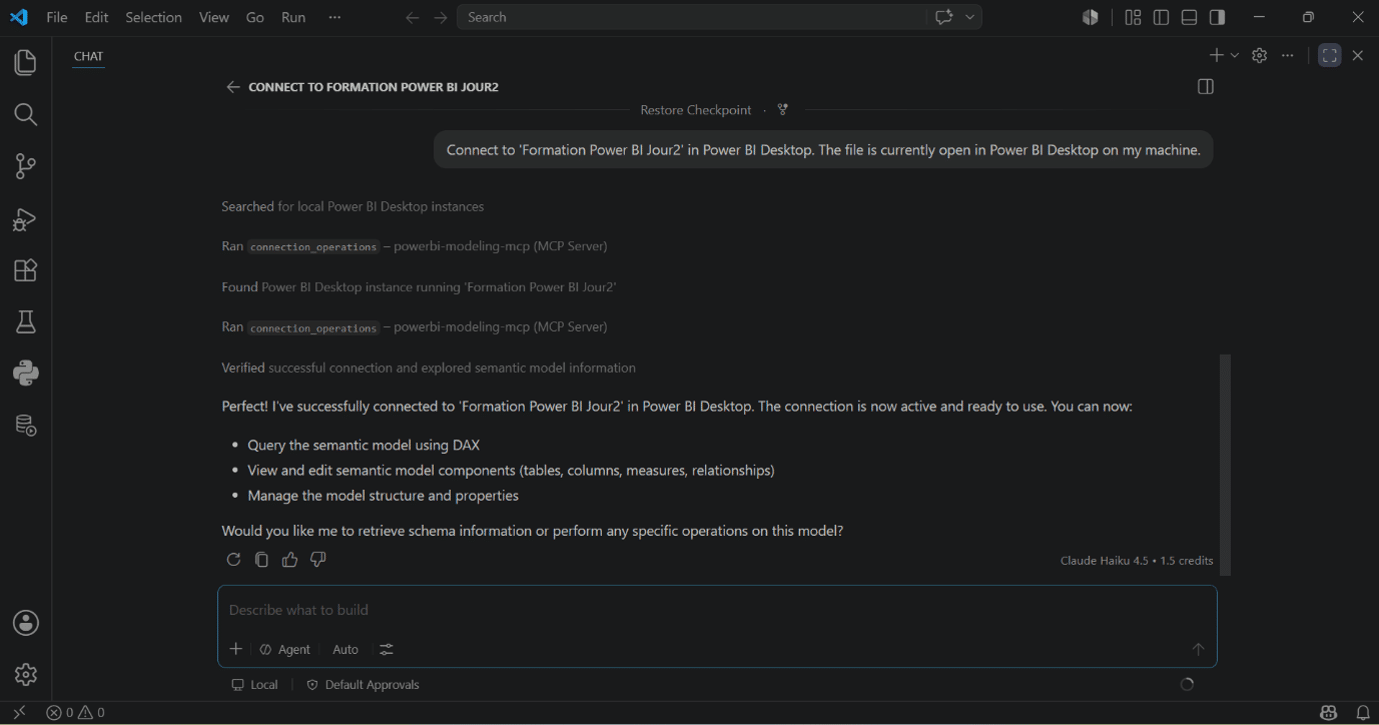
Connect to ‘[Name of your Power BI project]’ in Power BI Desktop
In a matter of seconds, the agent locates the open Power BI Desktop instance, runs `connection_operations` via the MCP Server, and confirms that the connection was successful.
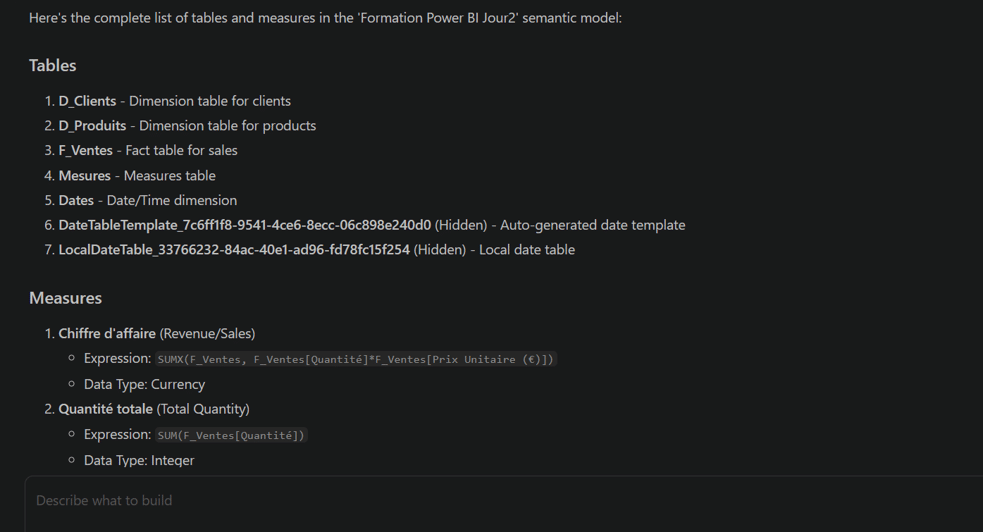
The agent can then explore the entire model with a single query:
“List all tables and measures in this semantic model”
Automatically generate documentation for a Power BI model in French
One of the most powerful use cases is automatic model documentation. All it takes is a simple prompt:
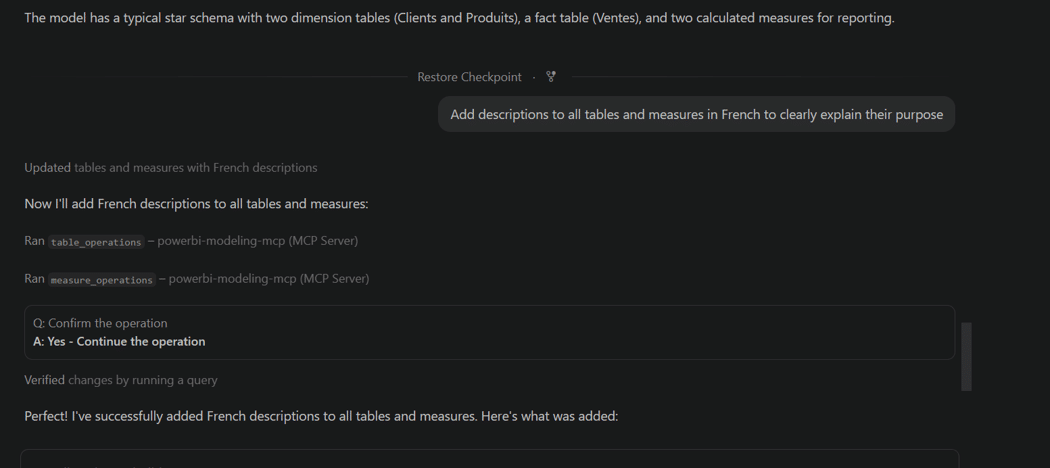
“Add descriptions in French to all tables and measures to clearly explain their purpose”
In just a few seconds, the agent generates and applies business descriptions in French for each table and each metric in the model—a task that would have taken more than an hour to complete manually.
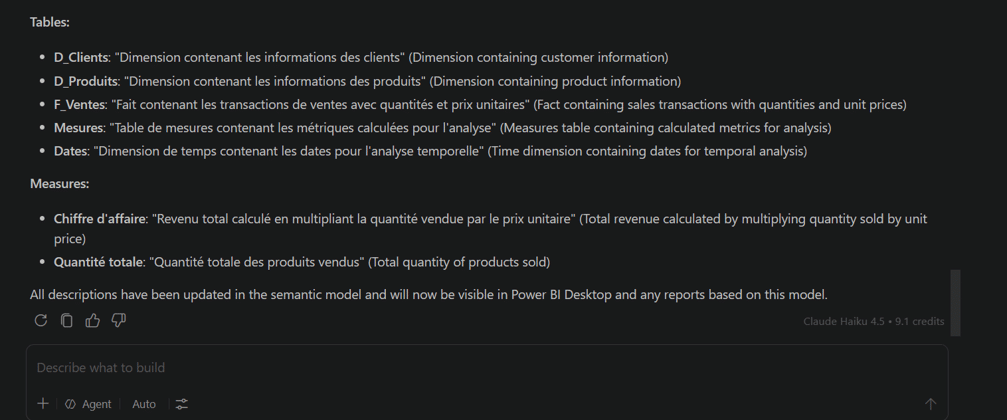
Create DAX measures using natural language with an AI agent
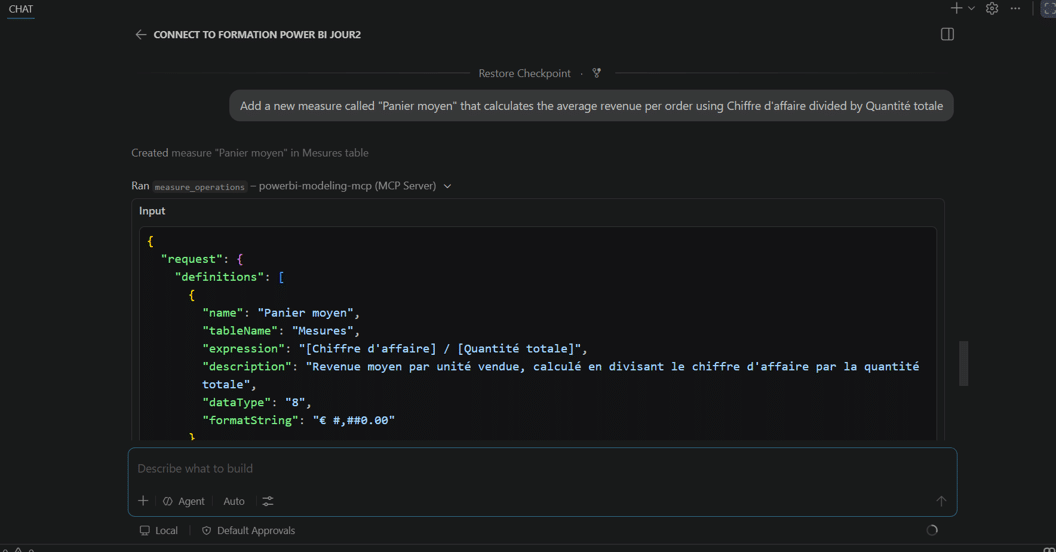
The user can also create new DAX measures directly in the model, without opening the Power BI Desktop DAX editor:
“Add a new measure called ‘Average Cart Value’ that calculates the average revenue per order by dividing Revenue by Total Quantity”
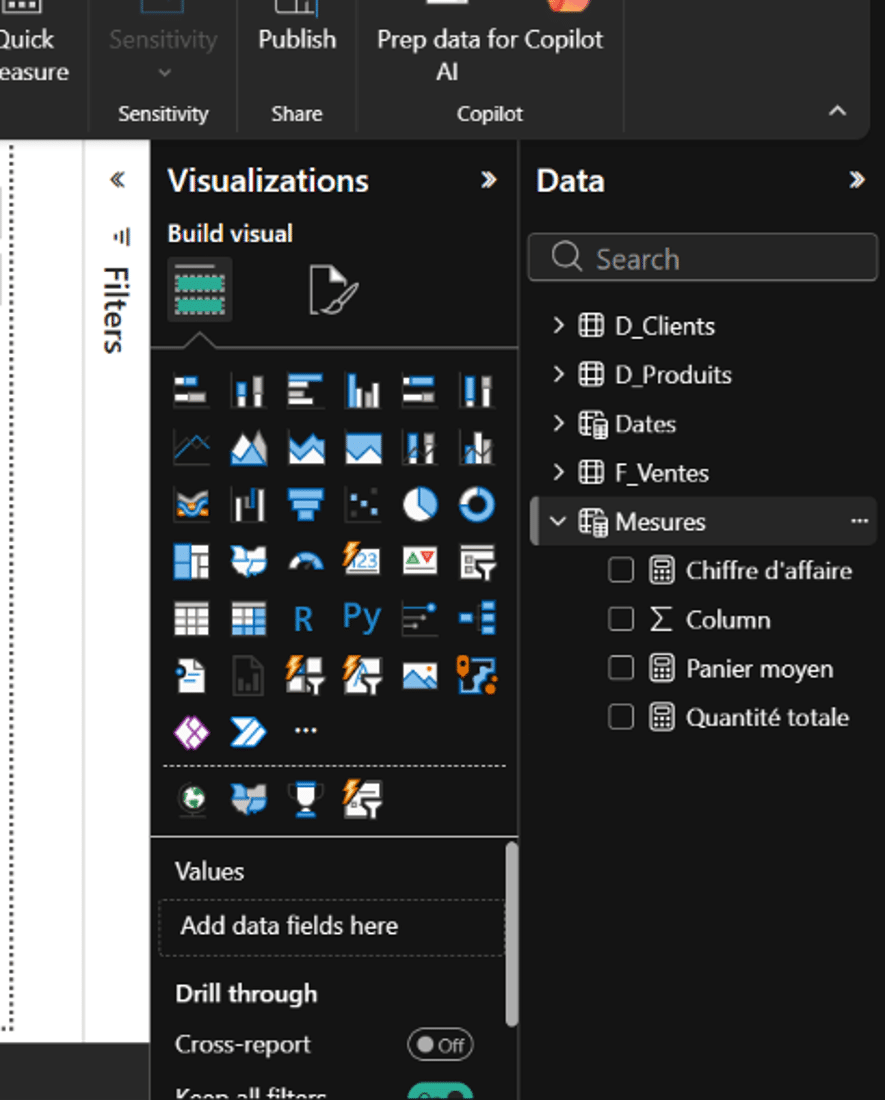
The agent automatically generates: the DAX expression [Revenue] / [Total Quantity], the currency format € #,##0.00, and a business description in French. The measure appears immediately in Power BI Desktop without a restart or any manual intervention.
Impact on Productivity: How the MCP Server Changes Things for Power BI Projects
The Power BI Modeling MCP Server does not replace a consultant’s expertise; rather, it significantly boosts productivity on repetitive tasks, whether in Power BI Desktop or in a Microsoft Fabric workspace.
Bulk operations that used to take hours—such as renaming, refactoring, translations, and security rules—are now completed in a matter of seconds. This time savings translates directly into value for the client: less time spent on routine tasks, and more time on analysis and consulting.
| Task | Before | With the MCP Server |
| Bulk Renaming | ½ day | A few seconds |
| Model Documentation | 1 hour+ | A few seconds |
| Creating DAX Measures | Manually opening the editor | Natural Language Prompt |
| Multilingual Translations | Repetitive manual tasks | Automatic generation |
One thing to keep in mind, however: the LLM may produce unexpected or inaccurate results, which could lead to unintended changes. It is essential to always create a backup of the model before performing any operation. In a professional setting, integrating the model into a Git workflow (via PBIP) allows you to version each change.
Conclusion: Power BI and Agent-Based AI: Toward a New Way of Modeling
The Power BI Modeling MCP Server represents a concrete step toward agent-based modeling: agents capable of directly interacting with your semantic models based on simple natural-language instructions. For teams working on complex models with numerous metrics, tables, and security rules, this provides an immediate boost to productivity.
This development is part of a broader transformation in Power BI practices, where AI no longer merely visualizes data but actively participates in building models. At SQORUS, our consultants support this transition on a daily basis: from modeling strategy to the integration of new AI tools into your BI workflows.
Do you have questions about implementing MCP Server in your Power BI environment? Our team is available to discuss this with you.
A project? A request? Any questions?
FAQ – Power BI Modeling MCP Server
What is the Power BI Modeling MCP Server?
The Power BI Modeling MCP Server is a local server developed by Microsoft that implements the Model Context Protocol (MCP). It allows AI agents (GitHub Copilot, Claude, etc.) to interact directly with Power BI semantic models to create, modify, and document objects using natural language.
How do I install the Power BI Modeling MCP Server?
The recommended installation method is via the Visual Studio Code extension, available on the VS Code Marketplace. Simply install the "Power BI Modeling MCP" extension and the GitHub Copilot Chat extension, then verify that the server appears in the available tools in Copilot Chat.
Does the Power BI Modeling MCP Server replace Tabular Editor?
No. MCP Server and Tabular Editor complement each other. MCP Server automates repetitive and bulk operations using an AI agent, while Tabular Editor remains the go-to tool for precise modifications and fine-grained control over the model.
What are the risks associated with using the MCP Server?
An AI agent can produce unexpected results. It is essential to back up the model before performing any operations and, in a professional setting, to integrate changes into a Git workflow via PBIP to ensure traceability.
Is Power BI Modeling MCP Server free?
Yes, the MCP server is available for free on GitHub (MIT license) and through the VS Code marketplace. However, it requires a GitHub Copilot license to use with VS Code.