


In brief
Controlling a Power BI semantic model using natural language is now possible thanks to the Power BI MCP Server. Automated documentation, DAX validation, and large-scale quality control: discover how our SQORUS consultants use it in the field to accelerate your BI projects.
Imagine asking your AI assistant to document your entire Power BI semantic model, correct naming conventions across hundreds of measures, or generate and validate complex DAX queries—all in just a few minutes, without manually touching a single line of code. That’s exactly what the Power BI MCP Server does—launched by Microsoft as a Public Preview at Microsoft Ignite in November 2025.
At SQORUS, we have tested and validated this integration in a dedicated environment. Here’s what this means in practice for your BI projects.
What is the Power BI MCP Server?
The Power BI MCP Server is an official Microsoft implementation of the Model Context Protocol (MCP), an open standard developed by Anthropic. It allows an AI assistant (Claude, GitHub Copilot, Cursor) to connect to your Power BI semantic models in a structured and secure way, whether in Power BI Desktop, a Fabric workspace, or Power BI Project (PBIP) files.
In practical terms, the Power BI MCP Server acts as a bridge between your AI assistant’s intelligence and the objects in your model: tables, measures, relationships, columns, calculation groups, and security roles.
One key point to remember: the MCP server only exposes modeling objects. It does not modify report pages or visualizations, and strictly adheres to the permissions already granted to the user for the Fabric file or workspace. Your data governance remains intact.
How does the Power BI MCP Server work?
In our case, the MCP Power BI server runs locally on the workstation and exposes the semantic model opened in Power BI Desktop to the Claude Desktop assistant.
To remember
The MCP server exposes only modeling objects (tables, measures, relationships, etc.). It does not modify report pages or visualizations, and respects the permissions already granted to the user on the Fabric file or workspace.
How the Power BI MCP Server Changes Things for Your BI Teams
Automated Technical Documentation
Generating comprehensive Markdown documentation for a model (tables, metrics, relationships, data sources) is one of the most time-consuming tasks for consultants and internal teams. With the Power BI MCP Server, a single command is all it takes to produce a structured deliverable, ready to be included in a project folder or shared with business teams.
Large-Scale Quality Control
Analyzing the consistency of naming conventions across an entire model, identifying orphaned measurements, and detecting missing relationships: these are all tasks that Claude can perform autonomously via the Power BI MCP Server, providing well-reasoned corrections for all affected objects.
Accelerated DAX Development and Validation
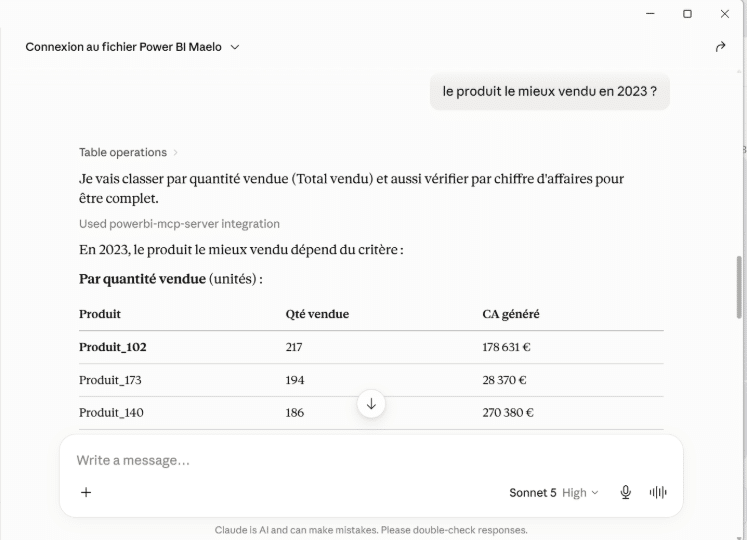
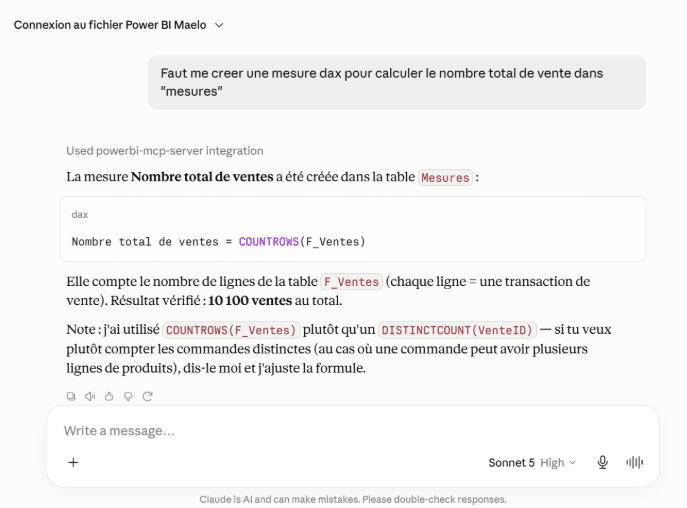
Create, run, and validate DAX queries directly from a conversation, with immediate feedback on errors or business logic inconsistencies. For projects involving a high volume of calculations (Finance, EPM, Management Accounting), the time savings are significant.
Refactoring and Model Industrialization
Grouping similar measures into calculation groups, migrating data source settings, and renaming hundreds of objects according to a defined naming convention: tasks that used to take entire days can now be completed in just a few minutes thanks to the Power BI MCP Server.
Turn your raw data into valuable insights
Contact us today to discuss how SQORUS can help you turn your raw data into valuable insights.

Installing the Power BI MCP Server with Claude: Prerequisites and Configuration
Prerequisites
Setup does not require advanced DevOps skills. Here’s what you need:
- Power BI Desktop installed, with a file open
- Claude Desktop (desktop app, available on Windows and macOS)
- Write permissions on the user folder for the MCP server installation
- Internet connection for the initial server download
Installation
- 1. Download the Power BI Modeling MCP server file (Microsoft package, distributed as a Visual Studio extension):
https://marketplace.visualstudio.com/_apis/public/gallery/publishers/analysis-services/vsextensions/powerbi-modeling-mcp/0.1.9/vspackage?targetPlatform=win32-x64
- 2. Rename the downloaded file from .vsix to .zip
- 3. Extract the contents to a dedicated folder, for example: C:\MCPServers\PowerBIModelingMCP
- 4. Run the executable: \extension\server\powerbi-modeling-mcp.exe
- 5. Copy the JSON record displayed in the console (the “MCP configuration for manual registration” block)
- 6. In Claude Desktop: Settings → Developer → Edit Config, open the claude_desktop_config.json file, then paste the configuration you copied in the previous step
{
“mcpServers”: {
“powerbi-mcp-server”: {
“command”: “[Path]\extension\server\powerbi-modeling-mcp.exe”,
“args”: [“–start”],
“type”: “stdio”
}
}
}
- 7. Save the file, then completely close Claude Desktop (including from the taskbar) before reopening it
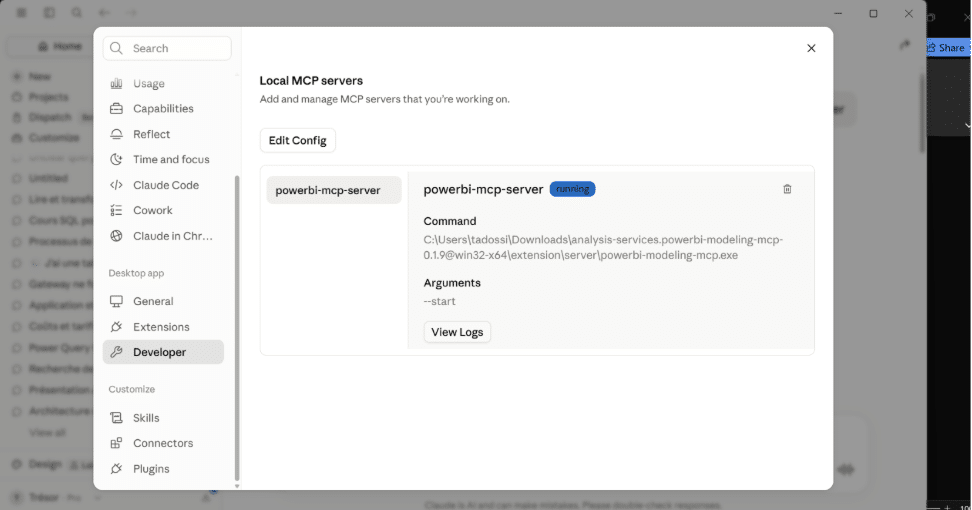
- 8. Check in Settings → Developer to make sure the “powerbi-mcp-server” server appears with the status “running”
- 9. Open the relevant Power BI Desktop file
- 10. In a Claude Desktop conversation, ask for the connection, for example:
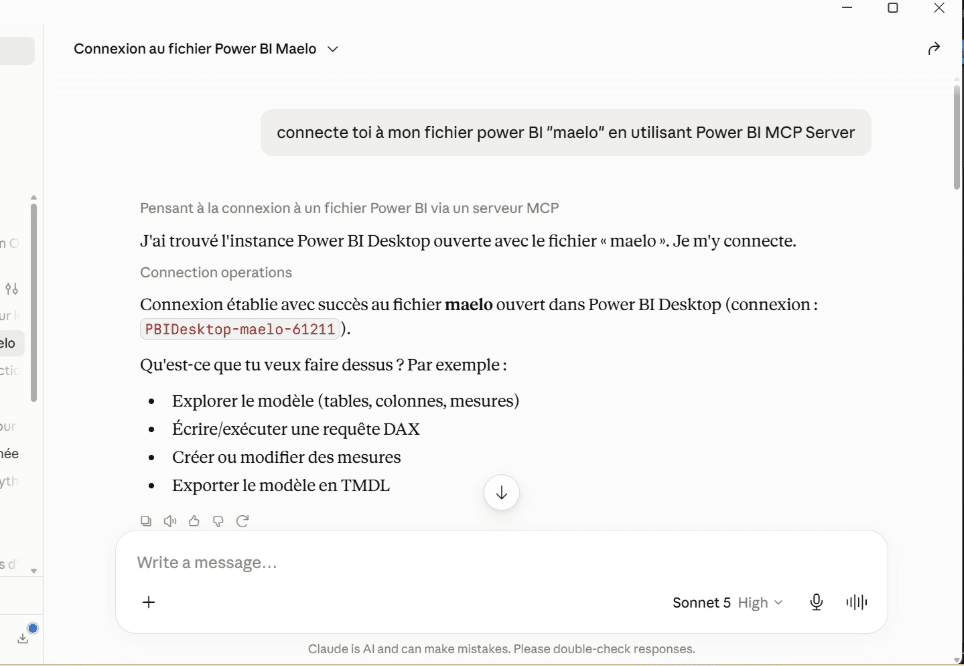
Claude identifies the corresponding open Power BI Desktop instance and establishes the connection. You can then interact with the model using natural language.
Use Cases for Our Power BI MCP Server Projects
At SQORUS, our BI projects cover the entire lifecycle of a semantic model: from design to production deployment, including the migration of existing data, auditing, and documentation. It is precisely during these phases that the Power BI MCP Server delivers the most value.
During the project takeover phase, our consultants are regularly called upon to take over existing models, which are often poorly documented or lack documentation altogether. With Claude connected via the Power BI MCP Server, the discovery phase is significantly shortened: analyzing the structure, mapping relationships, and identifying redundant or misnamed metrics—all of this is accomplished in just a few exchanges rather than several days of manual exploration.
During the modeling phase, the creation and validation of complex DAX measures are accelerated. Claude can propose a measure, run it directly against the model, and verify the result, reducing the back-and-forth between drafting and testing.
During the delivery phase, the production of technical documentation is an integral part of our client deliverables. Automatically generating structured, up-to-date documentation from the semantic model saves time on every project.
During the quality control phase, automated analysis of naming conventions, missing relationships, and modeling best practices enables our teams to deliver models that are more robust, more maintainable, and compliant with the standards defined with the client.
Conclusion: What the Power BI MCP Server Means for Your Projects
For large organizations that manage complex semantic models—which are often poorly documented and difficult to maintain—the Power BI MCP Server offers concrete opportunities:
- Reduced time to proficiency with existing models, particularly when taking over projects
- Accelerated standardization of models at the department or group level
- Increased productivity for BI teams, who can focus on analysis rather than repetitive tasks
- Improved traceability through automatically generated and regularly updated documentation
The Power BI MCP Server is no longer just a concept. It is up and running, tested, and ready for deployment today. It represents a paradigm shift in the way BI teams will work: no longer by clicking through interfaces, but by controlling their models through conversation.
Our experts incorporate these new approaches into their projects to provide you with tangible and measurable added value, starting from the very first weeks of a project.
Would you like to explore how the Power BI MCP Server could be applied to your models? Let’s talk.
All about IT project governance
Discover the roles and responsibilities of key profiles, as well as best practices in governance and technological development, to ensure the success of your digital transformation projects.
A project? A request? Any questions?
FAQ – Power BI MCP Server
Can the Power BI MCP Server modify the visuals in my reports?
No. The Power BI MCP Server only operates on the semantic model (tables, measures, relationships). Report pages and visuals are not accessible via this protocol.
Do you need a Fabric license to use the Power BI MCP Server?
No. The local connection via Power BI Desktop works without Fabric capacity. A connection to a Fabric workspace is possible but optional, via the remote server.
Is the Power BI MCP Server compatible with AI assistants other than Claude?
Yes. MCP is an open standard. The Power BI MCP Server is also compatible with GitHub Copilot in VS Code, Cursor, and other MCP clients.
Does the Power BI MCP Server work on macOS?
Claude Desktop is available on macOS, but connecting to a model opened in Power BI Desktop requires Windows, since Power BI Desktop is a Windows-only application.