In Brief
The Business Data Hub now features a new monitoring page: the employee profile. It consolidates the four key pieces of information from the Oracle HCM diagnostic report onto a single page: the employee’s current status, their upload history, any errors encountered, and changes made over time.
Why aren’t an employee’s records up to date in Oracle HCM ?
This question can sometimes lead to a complex investigation. When a support ticket is opened, the technical and TMA teams must reconstruct the employee’s history by consulting multiple sources: executions, logs, tables, and even HDL files.
To make this troubleshooting process simpler and more transparent, the Business Data Hub now includes a new monitoring page: the employee profile.
Currently available in the development environment, this new feature consolidates all the information needed to understand what happened to an employee onto a single page.
At a glance, it allows you to:
- view the employee’s current status
- find the entries related to them
- identify any errors
- track changes and corrections made over time
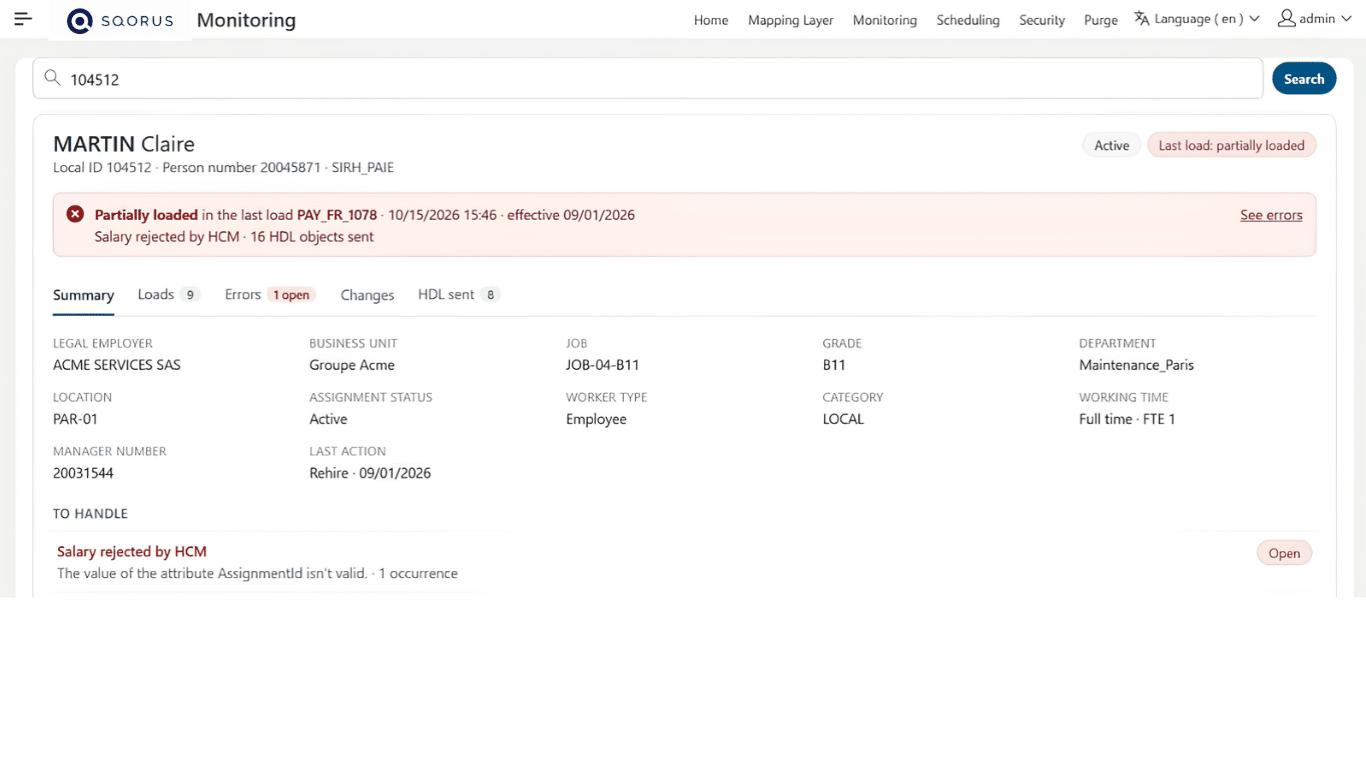
Caption: The employee profile summarizes the employee’s current status, the status of their most recent upload, and information useful for assessment—all on a single page.
Investigations that have so far been divided among several sources
Tickets related to an employee are common in TMA or during acceptance testing phases. Data may not be up to date, an import may be rejected, or information that differs from what is expected may appear in Oracle HCM.
To identify the source of the problem, the teams must locate the relevant runs and analyze each step of the processing. They review the lines sent, the errors encountered, and any associated HDL files.
This method allows you to find the necessary information, but requires you to navigate between multiple sources. Each piece of information provides only part of the answer. Teams must then piece it all together to understand the employee’s situation and explain it to the client.
The employee profile addresses this challenge by shifting from an analysis conducted on a per-task basis to a centralized view of the employee’s career path.
A one-time search to track an employee’s career path
The form allows you to search for an employee by last name, first name, or unique ID.
Once the search is launched, the page displays the information needed to answer four questions:
• What is the status of the employee’s most recent upload?
• Which runs are associated with them?
• What errors occurred?
• What information has changed based on the different effective dates?
The analysis is therefore no longer based solely on the general status of a run. It focuses on what actually happened for the employee in question.
Would you like to centralize the monitoring of your Oracle HCM data flows?
Talk to the experts at SQORUS to find out how the Business Data Hub can simplify incident diagnosis and improve the traceability of your HR data.

A clear picture of the current situation
The first section of the fact sheet presents the key information available in the database, such as:
- the legal employer
- the Business Unit
- the position
- the department
- status
- Last Action Performed
A banner also indicates the employee’s status in the most recent upload. This allows teams to verify whether the employee was successfully uploaded to Oracle HCM, whether the upload was rejected, or whether the process was blocked before submission.
This report is calculated based on the employee-specific rows, not solely on the overall status of the run. For example, a run marked as a warning may have correctly processed the employee in question.
This distinction helps us avoid jumping to conclusions and provides a more accurate understanding of each situation.
All posts accessible from a single page
The record then displays the history of the employee’s shifts.
For each run, teams can find:
- The general status of enforcement
- the employee’s specific status
- the action taken
- the effective date
- any errors encountered
The Request ID provides access to the details of the relevant execution. When an error occurs, a direct link also allows you to view the associated information.
This provides teams with a single point of access to view an employee’s history, without having to start their search from the monitoring dashboard to locate each transaction.
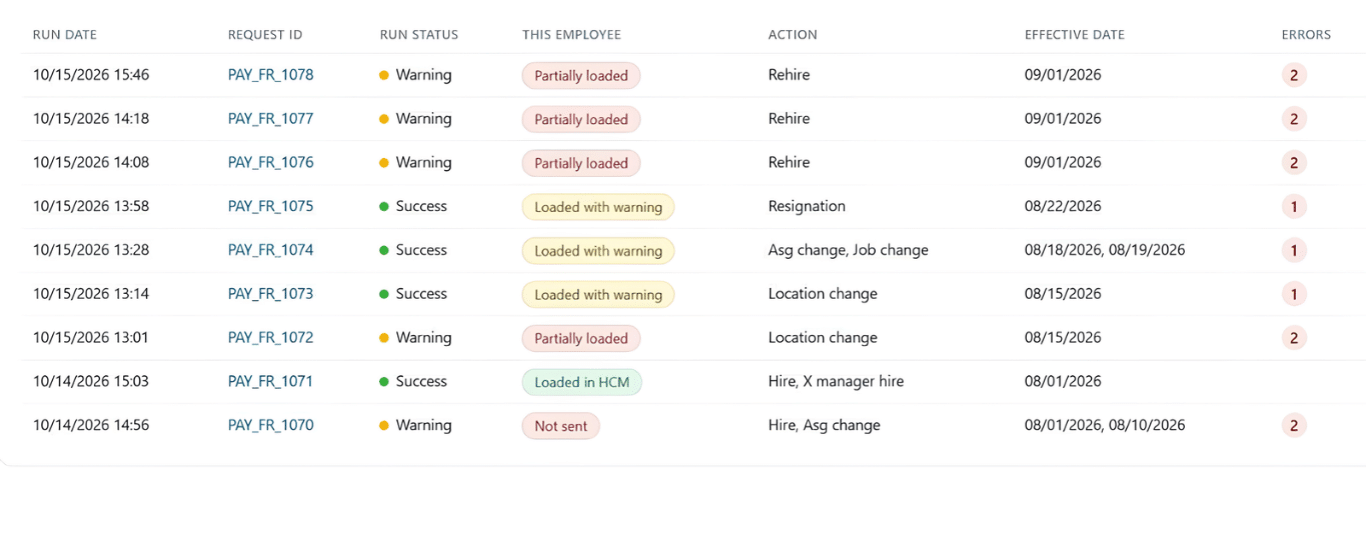
Caption: The history section lists the shipments associated with the employee and provides easy access to the details of each shipment.
Errors grouped together to facilitate diagnosis
Oracle HCM errors are grouped by type to minimize repetition and make them easier to read. Each occurrence can then be viewed along with the corresponding execution.
The fact sheet makes it possible, in particular, to distinguish between:
- an error in the last upload that is blocking processing
- a warning that did not prevent the employee from being submitted
- an older error that no longer appears in the latest run
Depending on the permissions granted and the options enabled, technical teams can also view details about the files that caused a rejection in Oracle HCM.
This level of information is restricted to super administrators and depends on the archiving of HDL lines.
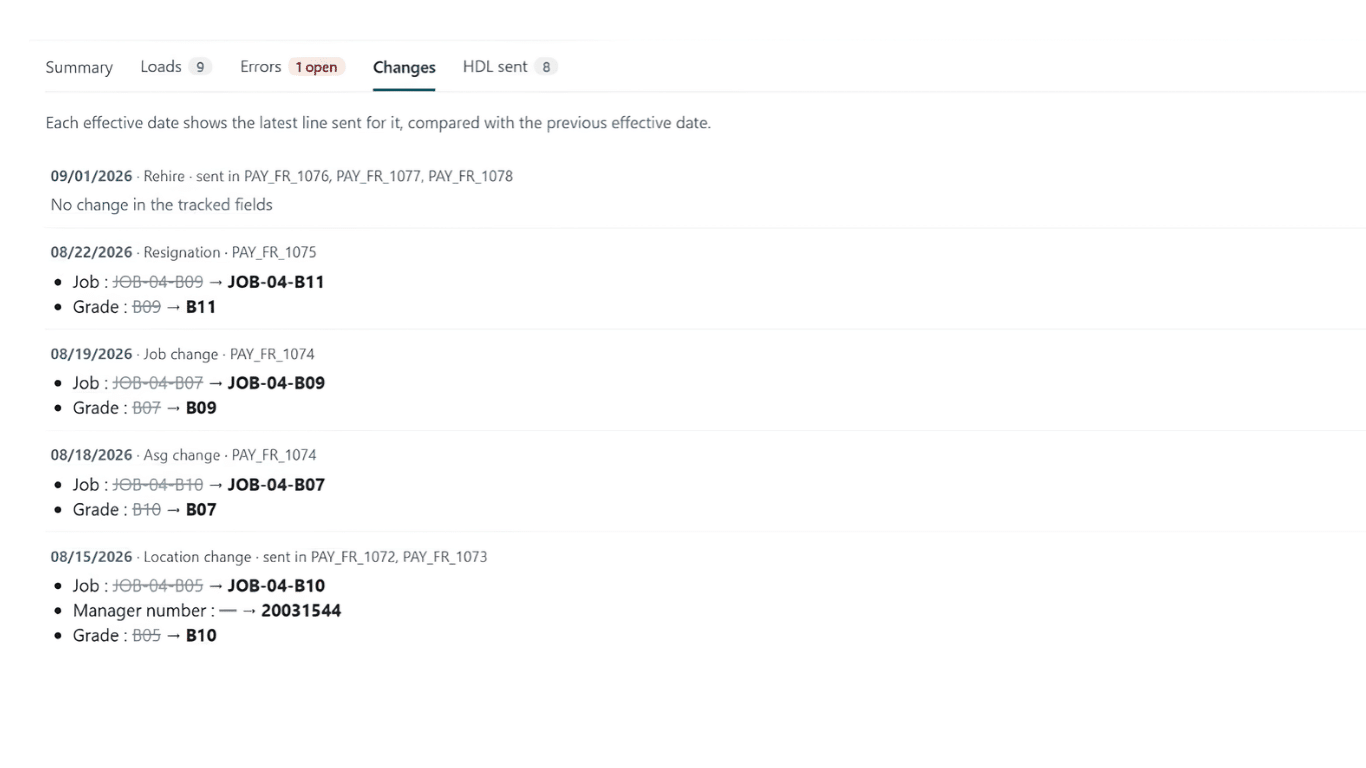
A History of Changes and Corrections
Understanding an employee’s situation involves more than just reviewing their most recent data upload. It is also necessary to be able to track the values that have been submitted over time.
This sheet therefore lists the changes recorded on each effective date. It specifies the affected fields as well as their old and new values.
Monitoring may include, among other things:
- the legal employer
- the Business Unit
- the position
- the department
- the location
- status
- Work Hours
- the manager
- the rank
When a different value was initially sent and then corrected in a subsequent upload, this change remains visible. This allows teams to trace the successive changes and better understand the cause of a discrepancy between two processing runs.
A clearer diagnosis for teams and clients
By consolidating this information, the employee record reduces the need to search through logs, tables, job runs, and HDL files.
For technical and TMA teams, this view makes it easier to identify the step at which the process encountered a problem.
For client HR teams, the response also becomes clearer and more precise. It’s no longer just a matter of indicating that a workflow has an error. Teams can explain:
- What happened to the employee
- When did the issue arise?
- what information was affected
- whether a correction was subsequently applied
The form also makes it possible to identify certain recurring negative events. Eventually, these patterns could be used to set up alerts and detect certain situations more quickly.
A page that is part of the Business Data Hub’s security policies
Access to the record follows the same rules already applied in the Business Data Hub dashboard.
Each user can view only the runs associated with the interfaces and systems within their scope. Details of HDL files and objects are restricted to super administrators.
The record does not display sensitive personal data such as date of birth, address, phone number, or salary.
Links to the records are also protected to prevent access to another employee’s information by simply modifying the URL.
A feature designed to evolve
The employee record was designed to be gradually extended to other Oracle HCM integrations within the Business Data Hub, as well as to the Core IT Tools scope.
Each interface will thus be able to display its records and rejections in a common format, using the same approach to centralization and traceability.
This new feature illustrates the approach taken to evolve the Business Data Hub:starting with a real-world scenario encountered in the field, gathering relevant information, and making data flow tracking more transparent for all teams involved.
Toward Simpler and More Transparent Oracle HCM Diagnostics
With the employee record, the Business Data Hub provides a practical solution to a common challenge encountered in TMA and during acceptance testing: understanding why an employee’s data is not up to date in Oracle HCM.
By compiling its current status, workloads, errors, and changes made over time, this new page is designed to make investigations more straightforward and provide customers with more accurate answers.
Currently available in the development environment, the employee record marks a new milestone in the evolution of the Business Data Hub. This evolution is driven by real-world use cases, with a consistent goal: to make it easier to track data flows and to make the data simpler to understand and use.
Do you have a project? A request? Any questions?
FAQ
What is the SQORUS Business Data Hub?
The Business Data Hub is a platform developed by SQORUS to centralize the monitoring of integration flows. From a single interface, it allows users to track data loads, analyze errors, and trace changes. In an Oracle HCM environment, it provides greater visibility into the data transmitted to the HRIS and its processing status.
How can I find out why an employee's data isn't up to date in Oracle HCM?
The employee record centralizes the information needed for troubleshooting: the employee’s current status, their upload history, any errors encountered, and changes made over time.
It makes it easier to identify the step at which a problem occurred, without having to search for the information separately in logs, tables, and HDL files.
How is access to employee record data secured?
Access to the record follows the Business Data Hub’s security rules. Each user can view only the data associated with their scope of interfaces and systems, while details of HDL files and objects are restricted to super administrators.
The profile does not display certain personal information, such as date of birth, address, phone number, or salary. Links are also protected to prevent access to another employee’s file by simply modifying the URL.