


Workday Studio is an Eclipse-based integrated development environment (IDE) specially designed to create and manage complex integrations within the Workday ecosystem. Workday.
As with any integration, you can launch, schedule and audit integrations created with Studio. You can also run these integrations from within Studio itself, or directly from the Workday application. In this way, Workday Studio enables you to design integration workflows that access information from Workday, manipulate it and, if necessary, pass it on elsewhere.
We’ll take a closer look at the commonly used methods of accessing data in a Workday Studio integration: transferring data by file attachment, via the secure SFTP protocol, and using Custom Reports with REST APIs.
The 3 main ways to access data with Workday Studio
1. Workday Studio integration method: file attachments
Attachment files are mainly data mapping files hosted in Workday. This means you can update these files directly in Workday, without having to redeploy Studio integrations every time you need to make a change.
Implementation process
1. Deployment: Deploy your Studio integration on your Workday environment.
2. Configuration: From the menu of associated actions for your Workday integration, choose “Integration System > Configure Integration Services”. Add an attachment service and select the desired attachment.
3. Data access: To access the attached file from within Workday Studio, use an XSLT+ element.
Please note: Each attachment service can only handle a single attachment. So if you need to add several attachments to your integration, you’ll need to create several attachment services.
2. Workday Studio integration method : data transfer via SFTP
Secure File Transfer Protocol (SFTP) is a secure way of transferring data files between Workday and other systems. It combines the functionality of FTP with a security layer added via SSH (Secure Shell). Data is encrypted during transfer.
By default, Workday offers a secure SFTP server for file transfers, which can be accessed from Workday Studio.
Implementation process
1. Deployment: Deploy your Studio integration on your Workday environment.
2. Configuration: From the menu of associated actions for your Workday integration, choose “Integration System > Configure Integration Attributes for Integration System”. Add and configure SFTP Endpoint, SFTP Username and SFTP Password.
3. Data access: To access the file on the SFTP from Workday Studio, use a sftp-out element.
Please note: There are 4 ways to transfer data via SFTP on Studio.
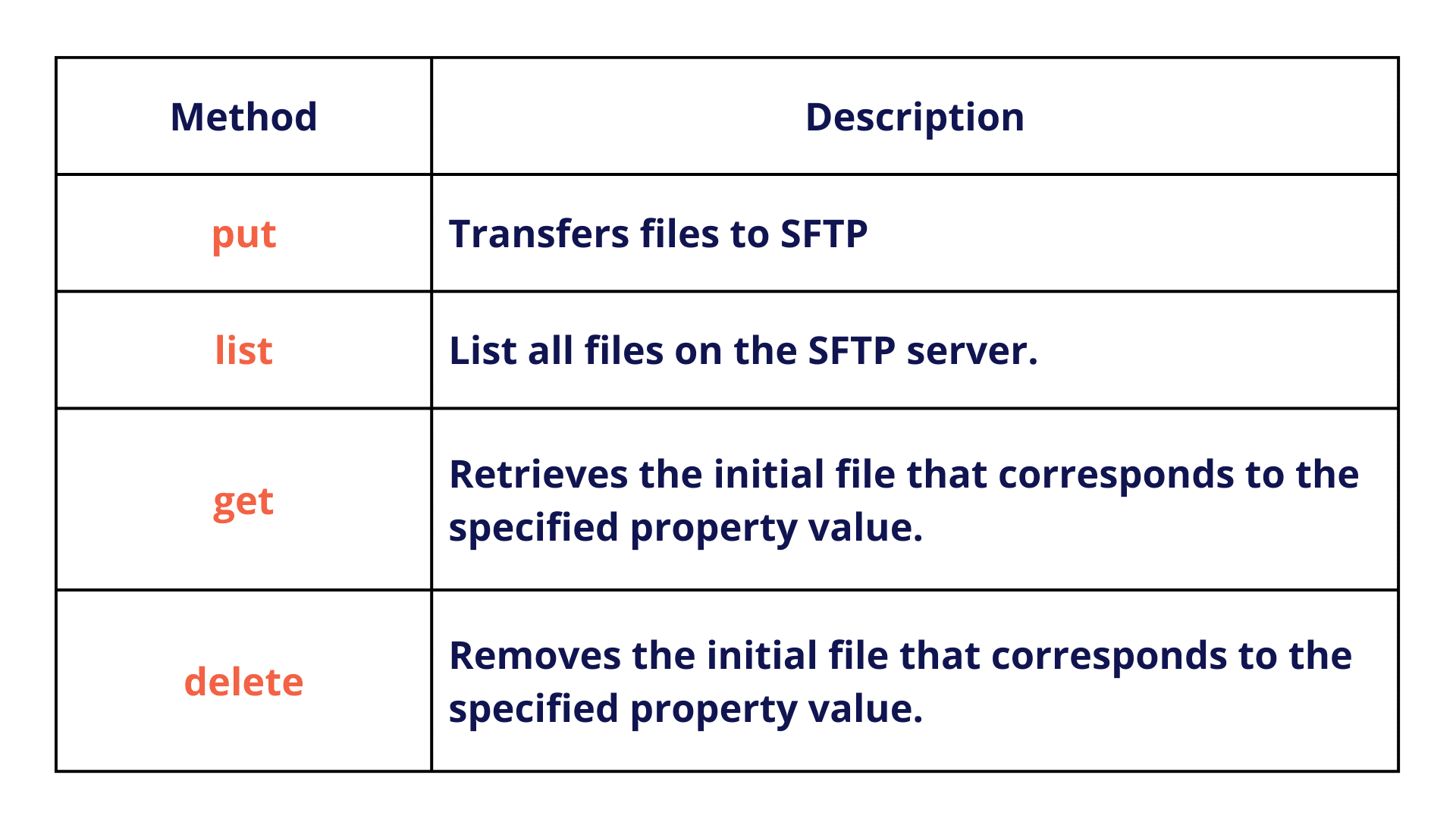
3. Workday Studio integration method: custom report and REST API.
Custom Reports allow you to create tailor-made reports that extract specific data in real time.
Implementation process
1. Report creation: Create a Custom Report on Workday. You can be as specific as you like, using filters, sub-filters or Calculated Fields …
2. Activation: From the Advanced section of your Custom Report creation, click on Enabled as a Web Service to turn your Custom Report into a Web Service.
3. Integration: To access the Custom Report from within Workday Studio, use a Workday-out-Rest element.
Please note: To retrieve a specific object from Custom Report data, you need to specify the path in the Web Service configuration, which you can find in the associated actions menu of your Report in Web Service > View URLs .
To deepen your knowledge of our Workday expertise, discover our complete support on Workday Financial Management and Workday HCM, two innovative cloud solutions that our consultants have mastered to guarantee you a successful digital transformation.
Comparison of methods
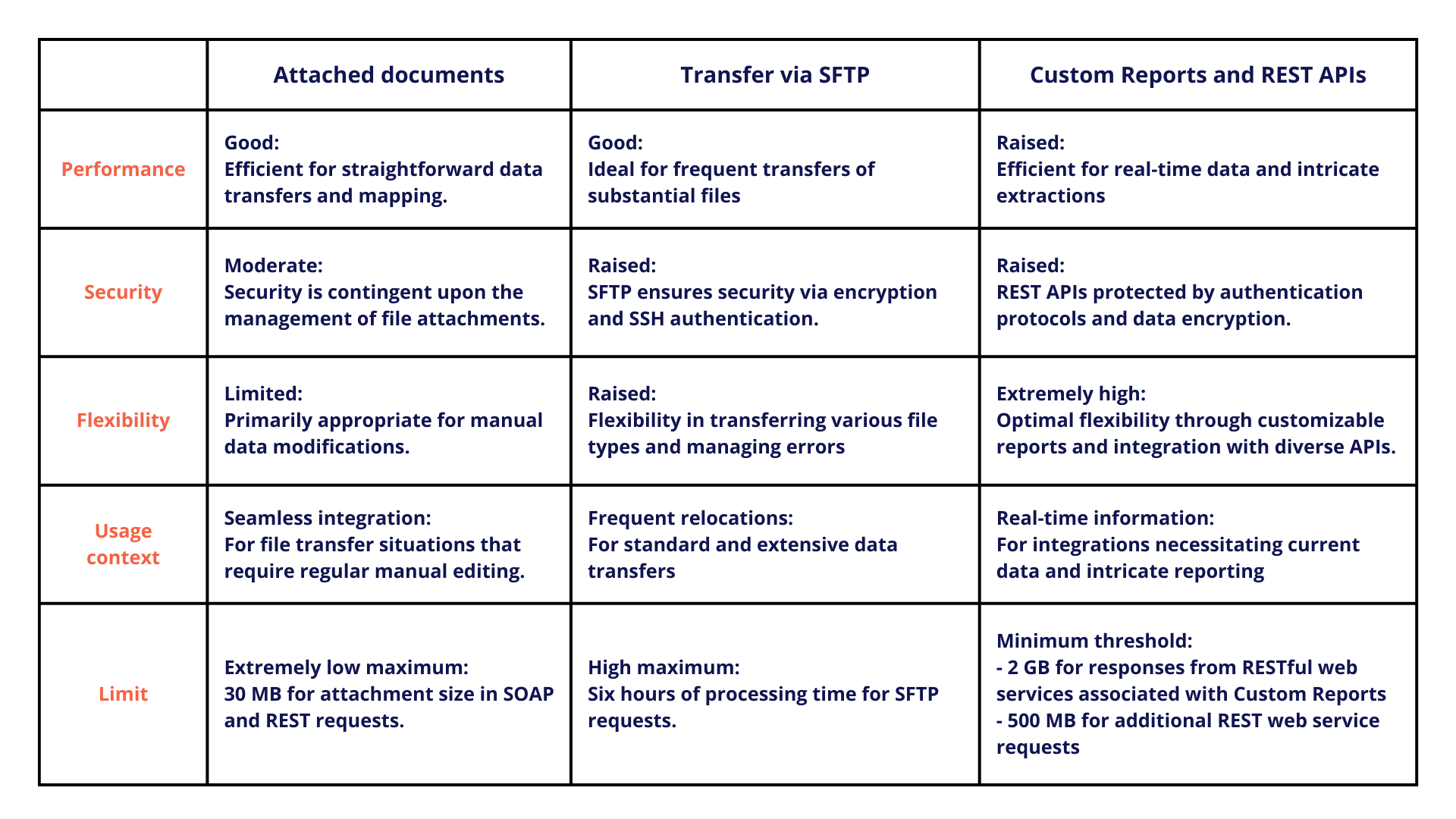
Case study data access with Workday Studio integration
Background and problems encountered
A developer at Company X is tasked with creating an integration that transfers employee expense reports from an accounting application to Workday. This project requires managing monetary data in multiple currencies, as employees are spread across different countries and pay their expenses in various currencies. It has 3 sources of data to retrieve for its development:
- Retrieve high-volume expense claim data securely from an external source
- Exchange rate management is updated weekly in an Excel file by the finance department.
- The distinction between internal and external employees is important when processing expense claims.
Proposed solution
The developer chooses to retrieve incoming data from a file transfer via SFTP. This method is chosen to transfer large CSV files securely.
To keep up to date with exchange rate conversions, he chooses to attach the currency conversion file, as rates are occasionally updated directly by the finance department.
Finally, to obtain real-time data on internal and external employees, the developer creates a Custom Report activated as a REST service.
Conclusion on Workday Studio integration
The choice of data access method in Workday Studio depends on several factors: data volume, update frequency, real-time requirements and security constraints. A successful integration strategy often combines several methods to optimize every aspect of the data flow.
With over 30 years’ experience in digital transformation and recognized expertise in Workday, SQORUS can help you. Whether you’re thinking about, implementing or optimizing Workday, we’re with you every step of the way. For personalized feedback, contact us directly.
All about IT project governance
Discover the roles and responsibilities of key profiles, as well as best practices in governance and technological development, to ensure the success of your digital transformation projects.
Contact
A project? A request?A question?
Contact us today and find out how we can work together to make your company’s digital future a reality.